Show Categories
133
4
koenrad posted Dec 21 '15 at 1:54 am

I've been using codoforum v3.4 for my gaming comunity website. I had about 100 users, but only 30 topics, with about 15 categories. Today 90% of the entire database is gone and lots of the pages that can be navigated to throw PHP errors. I have no idea how this happened, and was wondering if anyone else has experienced this before?

178
4

Could we have (default or optional) links clickable and smileys visible on the front page, even on posts with 'read me' links?

I ask because at the moment I have a 'Welcome' post stuck to the front page. It's short, but the link in it is not active and it is inconvenient for a new user to have to find their way right into the post to see it properly.

(In fact, mark-up generally seems not to display in previews).

134
2
James posted Dec 7 '15 at 8:50 pm

Because the "History" option is just shown up in posts which are made after the initial post (post from the thread starter). But I don't think it's the way it works because inside my testforums I have a thread/topic which has the History option too. There are no other posts inside this thread.
Could you please check this? Oh und yes permissons are set to see the history in topics and roles.

bug
286
4

i honestly think that CodoForum could take Forum communities and Blog communities by storm.. you have a minimalist forum that is easy and pleasing to look at and work with..

but feature wise is lacking massively.. i know you guys are focusing on alot of stuff related to the permission atm and smaller details.. but i honestly believe that you guys have too work fast to get some more features and more dynamics to the admins and owners of this script.

Some of my suggestions include this..

Upvoting :

basically a way for the users to control which content should be viewed around the community.. this gives the users the feeling of reward when their posts get large amounts of up votes.

it also give the other users the idea that they're directly influenced the site, and makes them feel like they are apart of it. Some of the best biggest sites uses these features and are the reason why they have so many users..

"Facebook with likes" "Reddit with up votes" "Twitter with retweets"

this is a massive feature which i believe should be option in the script.. i would think that the feature that would suit this script the most would be similar to Reddit, with up-votes..

Sharing:

i think the ability to share things is important. on both the out wards sharing to other sites and the inwards sharing towards the Owners site..
for example it should be posible to Share the topics on the site to other communities like facebook, twitter and reddit in a non plugin way..

but at the same time The site should be able to share things from other sites to The codoforum should be importent also, like a built in script on the site that is linked to a button we can give to other sites to automatically share onto the Codoforum script, like the reddit or tweet or facebook sharing button on news websites or youtube, so users could quickly share these pages.

ofcourse none of our sites would be big enough for these sites to add to their sites, but users could add this button too their google chromes, so if they wish to share quickly it will bring them to the posting area with the formatting of the sharing quickly

Friends / subscribed users list:

it should be important to add friends or atleast be able to subscribe too users to follow them if you like their idea's and information, which will post their material on a alternitive News feed perhaps on the users front page, which will have all their friends or subscribes on it.

more interesting navigation for users:

maybe on the phone style site, the menu with all the categories are on the left hand side, which pulls out, so users will not have to go back all the way to the homepage to see other categories and also it keeps them neatly away on the site but still accessible.

on Site wise, with maybe adding the Topic areas on the left hand side, as physiology has alot too do with the layout of a site.. The right side is never as intersting as the left side, (Example would be reddit) and maybe adding another navigation area on the top below the header bar would be intersting also..

54b4217d87943.png

208
2
redshare posted Dec 17 '15 at 1:59 am

Hi, i have a problem , i try to install latest version but dosen't work he give me an error with table can't be created, i try to execute sql but after he give me an error in codoforum\sys\vendor\illuminate\database\Illuminate\Database\Connection.php.

Now i succesful instaled v1.5 but i realy need latest version.
Ty

recent by redshare  ·  Dec 18 '15 at 4:06 am
125
6
Gramlin posted Nov 15 '15 at 2:19 pm

I think this is a bug:

  1. I have renamed a category. It displays on front page with new name but in the back-end list it still has the name it was created with.

  2. I have a block on the main menu. I renamed it in the back end, but the code does not update. I have to edit the code manually to change the text in the menu bar.

149
2
Cody posted Dec 7 '15 at 7:53 am

How can I fix these errors?

Notice:  Undefined offset: 10 in/home/[username]/public_html/sys/CODOF/Forum/Category.php</b> on line 130
[and]
Notice:  Trying to get property of non-object in/home/[username]/public_html/sys/CODOF/Forum/Category.php on line 130

Thank you.

recent by Cody  ·  Dec 13 '15 at 5:08 am
101
0
DaUrge posted Dec 12 '15 at 10:00 pm

I am enabling the SSO plugin and this is very confusing.

Even looking at the documentation, I can't get the USER paths correct.

My forum is in: www.mywebsite.com/forum/

Would the paths be: www.mywebsite.com/forum/client.php?
I did download the client.php page from the Pull Requests, but I'm not sure where to upload it.

And what about the other paths? www.mywebsite.com/forum/login.php
www.mywebsite.com/forum/logout.php

you see where I'm going?

If I follow the documentation, it would be something like this:
www.mywebsite.com/forum/client.php
www.mywebsite.com/forum/login.php
etc

Thanks!

201
6
tt posted Dec 9 '15 at 8:40 am

Hi

I have one question.
I have chosen not to show Avatar from the setting on the backend.
However the avatars is shown next to the name of the user in the Chatrooms.

How is this possible and how I can hide Avatars from everywhere?
Thanks!

recent by dm  ·  Dec 12 '15 at 9:38 pm
149
2
damsoi01 posted Dec 10 '15 at 8:59 pm

Hello,

I have freichat platinum 9.6, and everything works fine but the video chat. When I invite someone, or someone invites me, I get an error as attached in png.5669e7277caf4.png

I do not understand where it comes from, as it worked perfectly before I transferred my website to a new domain after my company changed of name.
I use Joomla 3.4.5, PHP 5.4.45, MySQLi 5.5.45-cll.

Thanks for the help!

recent by damsoi01  ·  Dec 11 '15 at 8:25 pm
524
1
gmdolfint posted Dec 8 '15 at 11:15 pm

SSO Integration with a WordPress Blog

This is not really a support request but a small guide that someone might find useful in the future. If this should not be here, by all means, feel free to delete it.

Preamble

Codoforum does seem to be a nice alternative to what one is accustom to use, and because of that, one does need to learn the terminology this software uses for certain things (e.g. categories instead of forums); in this regard, IMO, the documentation could be a bit better... but I digress.

Now, IMO, the documentation could be a bit better also on how to integrate SSO with your blog/website... Last night, maybe I was more tired than usual to understand and follow the instructions on how to do it (I found the instructions a bit confusing), but after a while I got it to work as it should.

I'm aware there's a WordPress plugin to integrate SSO with Codoforum, but that didn't work for me, so I just deleted it.

Integrating SSO with WordPress

Note: I set this up locally using MAMP.

My set up is like this:

  • WP Blog URL: http://localhost/codoforum/blog/
  • Codoforum URL: http://localhost/codoforum/forum/

In Codoforum, my SSO settings look like this:
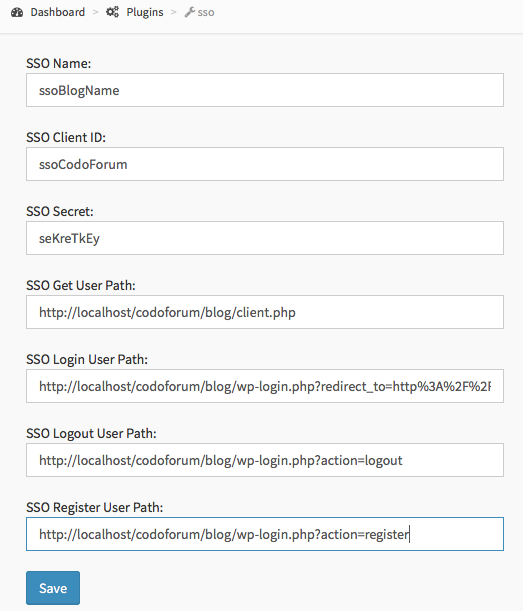
5667599b329ea.png

Note: since it looks truncated, in the SSO Login User Path field I'm redirecting back to the forum. The whole field value looks like this:

http://localhost/codoforum/blog/wp-login.php?redirect_to=http%3A%2F%2Flocalhost%2Fcodoforum%2Fforum%2F

My client.php files looks like this:

require 'sso.php';

define('ABSPATH', dirname(__FILE__) . '/');
include_once ABSPATH . '/wp-config.php';

/**
 * 
 * The SSO client id and secret MUST be same as that set in the Codoforum
 * SSO plugin settings
 */

$settings = array(

  "client_id" => 'ssoCodoForum',
  "secret" => 'seKreTkEy',
  "timeout" => 6000  
);

$sso = new codoforum_sso($settings);

$account = array();

/** getting wordpress user info **/
$blog_user = wp_get_current_user();
$blog_username = $blog_user->user_login;
$blog_userID = $blog_user->ID;
$blog_userEmail = $blog_user->user_email;


/*
 * 
 * Here comes your logic to check if the user is logged in or not.
 * A simple example would be using PHP SESSION
 */

if(isset($_COOKIE['PHPSESSID'])) {
    $account['uid'] = $blog_userID; //current logged in user's userid
    $account['name'] = $blog_username; //current logged in user's username
    $account['mail'] = $blog_userEmail; //current logged in user's email id
    //$account['avatar'] = ''; //not used as of now
}


$sso->output_jsonp($account); //output above as JSON back to Codoforum
exit();

Notice that since I need to pull the user's information from WordPress, I added these two lines of code:

define('ABSPATH', dirname(__FILE__) . '/');
include_once ABSPATH . '/wp-config.php';

Obvioulsy, my client.php and sso.php reside in the same directory where my wp-config.php does.

And then I'm assigning the properties of the wp_get_current_user() object to local variables. The rest of the code should be self explanatory.

At the beginning what confused me in the sample code was that the if() statement checking if the user is logged in had USER_IS_LOGGED_IN as its argument, which to me, was a constant, and I spent a bit of time trying to find where that constant was defined... obviously it turned out to be a placeholder... I know the comment above that line reads:

/**
 * 
 * Here comes your logic to check if the user is logged in or not.
 * A simple example would be using PHP SESSION
 */

But since, again, the argument looked like a constant to me, I thought that checking if a PHPSESSION was set was an alternative to using such "constant". Then I realized I was mistaken and changed my code accordingly.

Conclusion

I like the forum so far. I believe it has great potential and I want to learn it more... maybe to the point to develop plugins for it, and, as long time permits, maybe even be more active in the community (hopefully) helping others. We'll see.

Now, after a few more tests, I'm going to deploy my set up to my production server and see how it behaves live.

I hope these small steps can help someone save some time implementing SSO with their WP blog.

Thanks!

1.1k
28
steve posted Nov 30 '15 at 12:01 am

Well first of all i would like to say this is an awesome forum script you have developed here.

Now on to my issue, i have been attempting to merge the logins for my existing site and the forum script using the sso plugin. I followed the directions closely from the install page, and it does link to the login page of my website, but when logging in it doesnt in turn log me into the forum. Hope i am making sense so far.

What is baffling me though, is the logout on my main website will also log me out of the forum once logged in manually using the user/pass i created when installing the forum script.

in the client.php at the bottom

$account['uid'] = [i have actual username here from my website]; //Your logged in user's userid
$account['name'] = [username from website]; //Your logged in user's username
$account['mail'] = [my physical email address]; //Your logged in user's email id
$account['avatar'] = ''; //not used as of now

Not sure where i have gone wrong with this one :/

recent by steve  ·  Dec 10 '15 at 12:53 am
Categories
Actions
Hide topic messages
Enable infinite scrolling
All posts under this topic will be deleted ?
Previous
Next
With selected deselect topics
Pending draft ... Click to resume editing
Discard draft