Codoforum related discussions

Post all your questions and problems related to codoforum here .

252
6

Can it be that not a single theme exists for CF?

When will there be the long-announced area for themes and plugins?

If anyone has information about where I might get a dark theme for CF, please let me know.

Otherwise, I'll try it myself, with SCSS that should be feasible even if I do not have any experience with SCSS or LESS until now. I can only handle normal CSS3, HTML5 and a tiny little pit JS.

Kind regards,

Andy

140
2

Installation: localhost XAMMP

Live preview: Image attachment and emojis are displayed smile

Actual display: None, just alt text

DB table data samples:

  1. Image Attachment
    1. imessage: 5c3c592b0192d
    2. omessage: <p><a title="Click to view full size image" class="codo_lightbox_container"><img alt="5c3c592b0192d"></a> </p>
  1. Emoji
    1. imessage: (:|
    2. omessage: <img alt="smile">

Your help is very much appreciated. Thanks.

recent by WebCrew  ·  Jan 19 '19 at 12:58 pm
106
4
trevor.ambrose posted Jan 7 '19 at 10:02 am

Is the gold coloured box at the top of the Dasboard entitled 'User Registrations' meant to do anything when you click on it?

Mine does nothing.

The Blue 'Posts Made' box and the Green 'Topics Created' just take me to our Forum ……… which is what the Red 'Visit Forum' box does.

Is it broken?

Trevor.

86
1

Hello,

I am getting the same error as Ncathan. After uploading the unzip forum folder to my site and renaming it, when I try to install I get the following errors:

Warning: require(CODOF/Booter/Load.php): failed to open stream: No such file or directory in /home/u262969555/public_html/community/sys/load.php on line 25

Warning: require(CODOF/Booter/Load.php): failed to open stream: No such file or directory in /home/u262969555/public_html/community/sys/load.php on line 25

Fatal error: require(): Failed opening required 'CODOF/Booter/Load.php' (include_path='.:/opt/alt/php72/usr/share/pear' ) in /home/u262969555/public_html/community/sys/load.php on line 25

link to site: https://spartaninnovation.co/community/

646
8
N athan posted Aug 16 '15 at 8:58 am

Hello,

Today I found this wonderful website for a forum but after downloading all the files into the server when I access it it comes up with this message

Parse error: syntax error, unexpected T_STRING in /home/a6823068/public_html/codoforum/install/load.php on line 7

Does anyone know why this is happening?

Useful info:

I use 000webhost for the server
I used FileZilla to upload all of the files (the one folder)

128
2

Hey there,

I've got an old BBPress 1.x forum that's still running on PHP 5.6 and thus needs to be replaced rather sooner than later. smile

Codoforum seems like a perfect (read: much better) replacement, so I started work on an importer. I took the Codoforum driver as a blue print (as well as your documentation) and finally got it to work — well, almost.

The migration process didn't show any errors:

Importing categories and users...
Categories imported in : 0.07706093788147
users imported in : 0.38718104362488

Importing topics...
topics imported in : 0.76451396942139

Importing posts...
posts imported in : 39.410881996155

Checking counts of users...
user post counts updated in : 3.2901763916016E-5 s

Checking counts of topics...
topic counts updated in : 3.3855438232422E-5 s
category counts updated in : 4.5061111450195E-5 s

Importing permissions, bans, blocks, block_roles, edits, fields, fields_roles, fields_values

Import successfull in total time 40.639749765396 s

Looking at the database, I see that all users, categories, topics and posts are there, and the values seem okay. However, when I visit the forum, it appears to be empty — there are no posts and no categories.
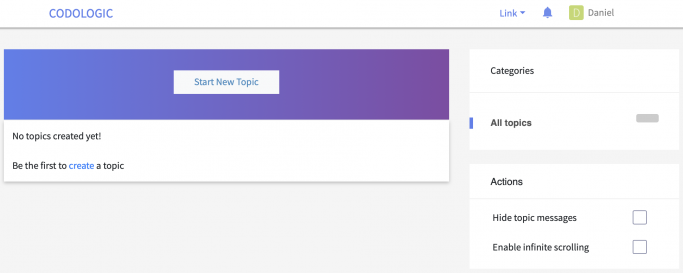
5c1a3c9859085

Looking into the admin area, it seems that nobody has permissions to view anything; and for whatever reason, I cannot change any permissions. See:
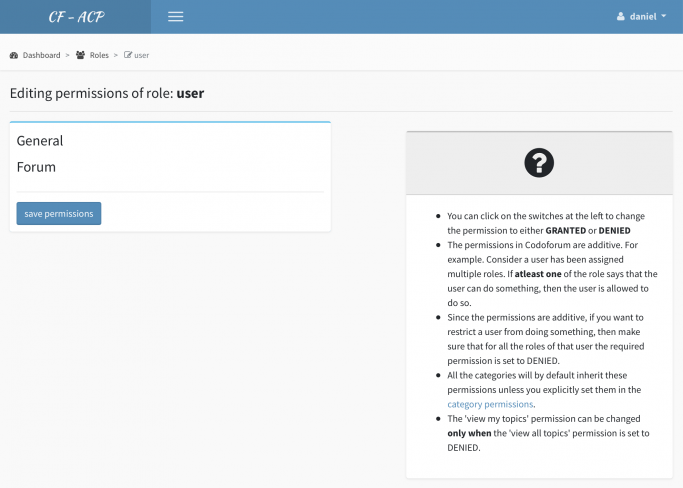
5c1a3a9ba37e4

A look at the database revealed that the codo_permissions table doesn't look right. Here's what's inside:

SELECT * FROM `codo_permissions`

pid rid cid tid permission  granted inherited   

1   0   0   0       0   0   
2   0   0   0       0   0   
3   0   0   0       0   0   
4   0   0   0       0   0   
5   0   0   0       0   0   
6   0   0   0       0   0   
7   0   0   0       0   0   
8   0   0   0       0   0   
9   0   0   0       0   0   
10  0   0   0       0   0   
11  0   0   0       0   0   
12  0   0   0       0   0   
13  0   0   0       0   0   
14  0   0   0       0   0   
15  0   0   0       0   0   
16  0   0   0       0   0   
17  0   0   0       0   0   
18  0   0   0       0   0

Before I run the migration script (with a vanilla Codoforum installation), there's much more content there.

All in all, it seems as if the permissions are somehow not set up correctly.

Does anyone have an idea what could be going on here?
I'd really appreciate any help! Thanks a lot in advance!

Cheers,
Daniel

P.S.: I'd also be happy to pay for official support, of course!

106
1

This is just a heads-up: users visiting codoforum.com currently get a warning that the SSL certificate has expired (which happened on Dec. 13th). Just in case you haven't noticed, I thought I better post this here so you can fix it.

Thanks for a great forum software, btw! I just discovered Codoforum last week, and I'm already considering migrating my old forum over. :-)

Cheers,
Daniel

recent by admin  ·  Dec 16 '18 at 10:28 pm
137
2
AmestrisBT posted Dec 1 '18 at 7:03 pm

Hello, I am trying to setup a SSL certificate that works fine with everything except Codoforum.

I contacted my hosting provider that stated I was having a SSL mismatch error.

Hi Adam,

Yes, this would be due to what is known as Mixed SSL content. I'll try to explain what's causing this issue in the best way that I can, however, I can see you're using Codoforum, which I don't have any experience with, so I might not be able to personally rectify this issue.

To make a site fully secure with SSL/HTTPS, all content needs to be sent over it, such as images, CSS/JS files and any other content which is being displayed. This means that all links to images and CSS/JS files must start with 'https://' prefix.

In the case of 'www.lightningworks.services', this is working perfectly fine, however, with 'www.lightningworks.services/marketplace', it seems to be sending some content over a non-SSL connection (this means the links start with the 'http://' prefix), which causes most browsers to display a warning. The error/warnings can be seen here -

Would you like me to try to rectify this myself, otherwise I would suggest it would be worth contacting their support?

Kind Regards,
Harry P

Director
OptNode Hosting

He told me later on to contact this support because he wasn't very familiar with Codoforum so does anyone know a solution?

121
3
Ann Lewis posted Nov 27 '18 at 2:24 pm

Could you please tell me how to moderate a post or topic.
I am set up as an admin with moderate post and topics enabled but cannot see what the mechanism is for actually doing this.

Is it possible to moderate or check a post or topic before it goes live on the forum for everyone to view?

recent by admin  ·  Nov 28 '18 at 4:20 pm
129
2
MattiasMagnusson posted Oct 30 '18 at 6:19 pm

So, basically i would love to know what file header content is located so i can retype all http requests to https to get ridd of an insecure warning of loading none secure content from my new page.

From this:

<link rel="apple-touch-icon" sizes="57x57" href="http://codoforum.com/img/apple-touch-icon-57x57.png">
        <link rel="apple-touch-icon" sizes="114x114" href="http://codoforum.com/img/apple-touch-icon-114x114.png">
        <link rel="apple-touch-icon" sizes="72x72" href="http://codoforum.com/img/apple-touch-icon-72x72.png">
        <link rel="apple-touch-icon" sizes="144x144" href="http://codoforum.com/img/apple-touch-icon-144x144.png">
        <link rel="apple-touch-icon" sizes="60x60" href="http://codoforum.com/img/apple-touch-icon-60x60.png">
        <link rel="apple-touch-icon" sizes="120x120" href="http://codoforum.com/img/apple-touch-icon-120x120.png">
        <link rel="apple-touch-icon" sizes="76x76" href="http://codoforum.com/img/apple-touch-icon-76x76.png">
        <link rel="apple-touch-icon" sizes="152x152" href="http://codoforum.com/img/apple-touch-icon-152x152.png">
        <link rel="icon" type="image/png" href="http://codoforum.com/img/favicon-196x196.png" sizes="196x196">
        <link rel="icon" type="image/png" href="http://codoforum.com/img/favicon-160x160.png" sizes="160x160">
        <link rel="icon" type="image/png" href="http://codoforum.com/img/favicon-96x96.png" sizes="96x96">
        <link rel="icon" type="image/png" href="http://codoforum.com/img/favicon-16x16.png" sizes="16x16">
        <link rel="icon" type="image/png" href="http://codoforum.com/img/favicon-32x32.png" sizes="32x32">

to this:

<link rel="apple-touch-icon" sizes="57x57" href="https://codoforum.com/img/apple-touch-icon-57x57.png">
        <link rel="apple-touch-icon" sizes="114x114" href="https://codoforum.com/img/apple-touch-icon-114x114.png">
        <link rel="apple-touch-icon" sizes="72x72" href="https://codoforum.com/img/apple-touch-icon-72x72.png">
        <link rel="apple-touch-icon" sizes="144x144" href="https://codoforum.com/img/apple-touch-icon-144x144.png">
        <link rel="apple-touch-icon" sizes="60x60" href="https://codoforum.com/img/apple-touch-icon-60x60.png">
        <link rel="apple-touch-icon" sizes="120x120" href="https://codoforum.com/img/apple-touch-icon-120x120.png">
        <link rel="apple-touch-icon" sizes="76x76" href="https://codoforum.com/img/apple-touch-icon-76x76.png">
        <link rel="apple-touch-icon" sizes="152x152" href="https://codoforum.com/img/apple-touch-icon-152x152.png">
        <link rel="icon" type="image/png" href="https://codoforum.com/img/favicon-196x196.png" sizes="196x196">
        <link rel="icon" type="image/png" href="https://codoforum.com/img/favicon-160x160.png" sizes="160x160">
        <link rel="icon" type="image/png" href="https://codoforum.com/img/favicon-96x96.png" sizes="96x96">
        <link rel="icon" type="image/png" href="https://codoforum.com/img/favicon-16x16.png" sizes="16x16">
        <link rel="icon" type="image/png" href="https://codoforum.com/img/favicon-32x32.png" sizes="32x32">

ideas?

recent by admin  ·  Oct 31 '18 at 3:43 pm
55
0

[4.4.1]

  • Regions not shown in UI Elements -> Blocks fixed
  • Fixed embed of videos and audios from external websites on https
  • Fixed theme background image bug
  • Fix facebook id showing in exponential bug
  • Fixed delete button for topics

[4.4]

  • Codopm redesign
  • Fixed upgrade bug
  • Hybridauth oauth login rewrite
  • Mobile theme fixes
  • Upgraded bootstrap from 3 to 4
  • Add dedicated page support for plugins
  • Rewrite theme loading. Moved everything common to default theme
  • read more link bug fix
  • Updated LighnCandy and Smarty
  • Added Ignis theme

Thanks guys will be upgrading soon smile

275
5
kostas.petros posted Sep 18 '18 at 8:09 am

Are there any instructions of how to use it with Sqlite ?

I am using XAMPP and codoforum v4.4.
I tried to use the SQLITE db and get the following error:

Fatal error: Uncaught InvalidArgumentException: Database does not exist. in C:\xampp\htdocs\codoforum-sqlite\sys\vendor\illuminate\database\Illuminate\Database\Connectors\SQLiteConnector.php:32 Stack trace: 
#0 C:\xampp\htdocs\codoforum-sqlite\sys\vendor\illuminate\database\Illuminate\Database\Connectors\ConnectionFactory.php(59): Illuminate\Database\Connectors\SQLiteConnector->connect(Array) 
#1 C:\xampp\htdocs\codoforum-sqlite\sys\vendor\illuminate\database\Illuminate\Database\Connectors\ConnectionFactory.php(47): Illuminate\Database\Connectors\ConnectionFactory->createSingleConnection(Array) 
#2 C:\xampp\htdocs\codoforum-sqlite\sys\vendor\illuminate\database\Illuminate\Database\DatabaseManager.php(127): Illuminate\Database\Connectors\ConnectionFactory->make(Array, 'default') 
#3 C:\xampp\htdocs\codoforum-sqlite\sys\vendor\illuminate\database\Illuminate\Database\DatabaseManager.php(63): Illuminate\Database\Data in C:\xampp\htdocs\codoforum-sqlite\sys\vendor\illuminate\database\Illuminate\Database\Connectors\SQLiteConnector.php on line 32
recent by mattsmith  ·  Oct 5 '18 at 12:16 am
908
4.41k
22
Sub Categories
Actions
Hide topic messages
Enable infinite scrolling
Previous
1 ... 567891011 ... 46
Next
All posts under this topic will be deleted ?
Pending draft ... Click to resume editing
Discard draft