Hello,
I am testing this setup on my local machine before putting it into production but I am having trouble authenticating into the Codoforum page.
I have an existing database of users and installed Codoforum into the same database. I installed the Codoforum code into a directory called forum - ran the setup and can log in successfully as an admin in order to enable the plugin.
I have these settings in the plugin:
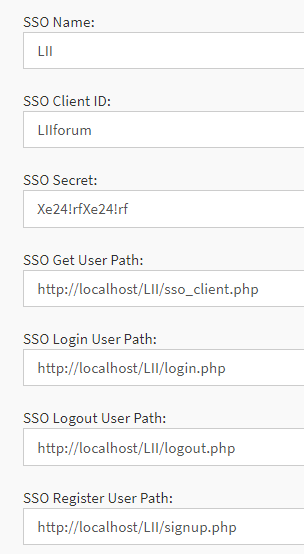
I downloaded the associated sso files (client.php and sso.php) into the main directory (LII) with the login, logout, and register pages. (Codoforum is in the "LII/forum" directory).
I renamed the default client.php to sso_client.php (so it didn't conflict with the existing webpage). I added some basic print commands to see what is happening and when I browse to the sso_client.php file, it shows this:
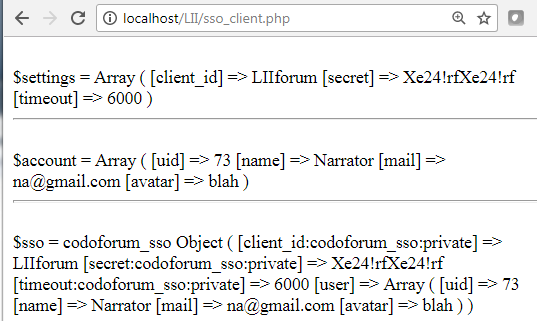
The $settings array shows that the plugin and the client php file settings match.
The $account array shows that I am obtaining session information for the user that is logged in.
And since I don't see any errors, I assume the $sso array is successfully being passed into Codoforum
Therefore, this is where I need some guidance:
If I am logged into my existing page, am I able to just open the forum page location from a hyperlink on the main site?
If so, when I go to http://localhost/LII/forum/ am I supposed to relogin in order to have the SSO authenticate?
I know everything is installed fine because if I login to the admin control panel and then type this location: http://localhost/LII/forum/

It shows that I am logged in as an admin. However, when I logout, it takes me to the correct logout page that I setup in the plugin. And then if I login to my main page as a regular user, and access the same forum location: http://localhost/LII/forum/
it doesn't authenticate me.

Any information you can provide would be helpful.
Thank you,
Scott R. Simon
Hello,
I am testing this setup on my local machine before putting it into production but I am having trouble authenticating into the Codoforum page.
I have an existing database of users and installed Codoforum into the same database. I installed the Codoforum code into a directory called forum - ran the setup and can log in successfully as an admin in order to enable the plugin.
I have these settings in the plugin:
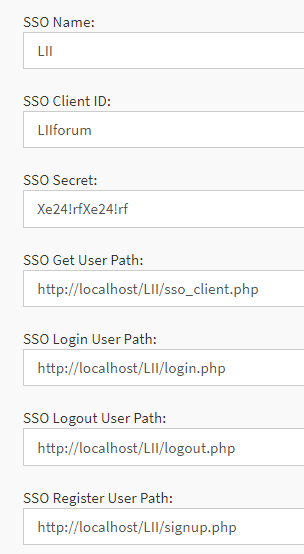
I downloaded the associated sso files (client.php and sso.php) into the main directory (LII) with the login, logout, and register pages. (Codoforum is in the "LII/forum" directory).
I renamed the default client.php to sso_client.php (so it didn't conflict with the existing webpage). I added some basic print commands to see what is happening and when I browse to the sso_client.php file, it shows this:
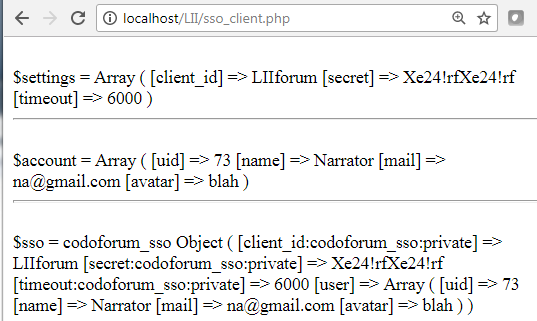
The $settings array shows that the plugin and the client php file settings match.
The $account array shows that I am obtaining session information for the user that is logged in.
And since I don't see any errors, I assume the $sso array is successfully being passed into Codoforum
Therefore, this is where I need some guidance:
If I am logged into my existing page, am I able to just open the forum page location from a hyperlink on the main site?
If so, when I go to http://localhost/LII/forum/ am I supposed to relogin in order to have the SSO authenticate?
I know everything is installed fine because if I login to the admin control panel and then type this location: http://localhost/LII/forum/

It shows that I am logged in as an admin. However, when I logout, it takes me to the correct logout page that I setup in the plugin. And then if I login to my main page as a regular user, and access the same forum location: http://localhost/LII/forum/
it doesn't authenticate me.

Any information you can provide would be helpful.
Thank you,
Scott R. Simon