Codoforum related discussions

Post all your questions and problems related to codoforum here .

150
3
harry posted Apr 16 '16 at 11:51 am

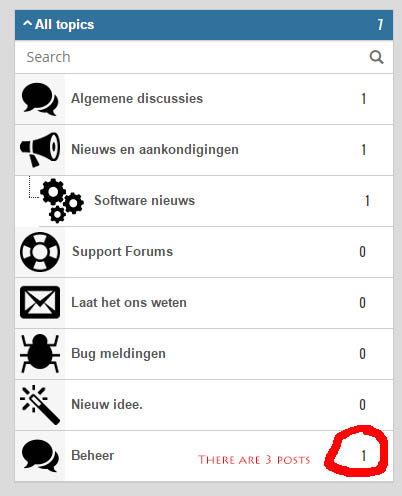
After setup two posts in a section on my forum v.3.5.1 it looks they are not visible in the section where their are posted.

I had write in total 3 posts, but there was only one visable. because I used tags in the posts, i have used the search function, and wow there I found only one of the other, but there is 1 missing post!

Someone can tell me whats happened or how is this possible?

571219c041385.jpg

recent by harry  ·  Apr 16 '16 at 1:09 pm
65
0
harry posted Apr 16 '16 at 12:04 pm

I have more posts into one section, but on the main page show this section only 1 post.

57121bec665ec.jpg

Someone can tell me why this is not really working?

I use version 3.5.1

291
4
exarhis posted Apr 13 '16 at 12:31 pm

Hi,
I try to set it to Greek.

I saw at the db the omessage at the table post.
There it stores the post not with the UTF-8 characters but with html (& alpha; ...)
And the page source has no Greeks only html characters
Why.

Is there any solutiuon to speak Greek ?

Thank you

126
1
JustinHD posted Apr 7 '16 at 1:16 am

First off, I am getting the following erroe:

Fatal error: Uncaught exception 'PDOException' with message 'could not find driver' in /usr/share/nginx/html/landing-page/todo/php/todo.php:29 Stack trace: #0 /usr/share/nginx/html/landing-page/todo/php/todo.php(29): PDO->__construct('sqlite:../db.sq...'smile #1 {main} thrown in /usr/share/nginx/html/landing-page/todo/php/todo.php on line 29

Also, my post counts go negative after deleting a topic.

5705a7609dbc6.png

397
4
Panchux posted Apr 3 '16 at 11:01 pm

Hi codoforum gurus!

Yesterday I successfully installed version 3.4-Beta and upgraded it to 3.5.1. So far, so good.

My server OS, Apache and PHP versions are: Ubuntu 12.04 with Apache v2.4.16 and PHP 5.6.20

The only problem I'm experiencing is about uploading files. First I notice I was not able to change my avatar, the error given was "File is empty"

57018fade03eb.jpg

The next error about uploading comes when I try to do it while writing a post. No error is given, image (or file) just won't upload to the server and no code is written in the post body.

I thought the problem could be directory's permissions but they seems to be ok

# ll
total 28K
drwxrwxr-x 8 www-data www-data 4.0K Apr  2 19:28 ..
drwxrwxr-x 2 www-data www-data 4.0K Apr  2 19:28 attachments
drwxrwxr-x 2 www-data www-data 4.0K Apr  2 19:28 general
drwxrwxr-x 7 www-data www-data 4.0K Apr  2 19:28 .
drwxrwxr-x 2 www-data www-data 4.0K Apr  2 19:28 smileys
drwxrwxr-x 3 www-data www-data 4.0K Apr  2 19:28 cats
drwxrwxr-x 4 www-data www-data 4.0K Apr  3 17:19 profiles

So now I'm pretty lost.

Can you help me?

recent by Panchux  ·  Apr 7 '16 at 2:13 am
78
0

Hey guys,
I have installed a brand new forum on my webspace: http://centrodepolitica.cf

Two problems: First, Ihave a few error logs on the foot of my site, how can I delete them?

Then, when you want to login, the login button don't works. You hav to click first on the login button, but nothing happens, then you have on a link to the site, for example the header. I created an example login for you:

name: test
password: test12345

How can I fix that? Please help me, I love this software so much... smile

142
2
fmx_1988 posted Mar 25 '16 at 6:01 pm

Hi, it seems that there is a glitch that causes one column to remain static as you scroll whilst the other column moves. This causes the footer to rise up above the static column.

The footer looks slightly different too on that particular page and i'm guessing that is some how related to the same problem.

Please could you have a look at the profile page please?

username = test_account
password = test account

thanks, Richard

175
1

Hello Everyone ! I am having a hard time integrating codoforum with my existing Python based web framework. I have codoforum hosted on different server than my python site. I have tried the sso plugin and codofoum-sso example on github but I think I wont be able to get the logged in user using that.

A work around that I am thinking of (Even though might be a bad practice) is to automatically register a user on codoforum when he registers on my python site.

I was trying to figure out how to make an http post request to index page with appropriate parameters to register a user. and same for login page. I tried taking id's of form fields and posting them but it dint work.

Thanks , for you time

183
3
Hacky posted Mar 30 '16 at 1:24 pm

I recieved an error after updating on the backend.It says:

Fatal error: Uncaught exception 'PDOException' with message 'could not find driver' in /usr/share/nginx/html/landing-page/todo/php/todo.php:29 Stack trace: #0 /usr/share/nginx/html/landing-page/todo/php/todo.php(29): PDO->__construct('sqlite:../db.sq...' #1 {main} thrown in /usr/share/nginx/html/landing-page/todo/php/todo.php on line 29

And some functions doesnt work properly,for example it shows 5 Notifications but in fact there isn't any notification.And It doesn't disappear,I can't open Notification it just loading...Who can help me how to fix that bugs?
56fbc570aebc6.png
56fbc570cdfc8.png

219
1

Hi @adesh1414127033 ,

I have got this error in codoforum v3.5.

Go to

http://codologic.com/forum/index.php?u=/category/codoforum-related-discussions

and click to the Create new Topic textarea. After create a topic, I can not post it. It says

CODOF.datepicker is undefined

I have to go back to the Add new Topic button to create new topic.

For this forum, v3.5.1, you wil get this error

<br />
<b>Notice</b>: Undefined index: is_auto_close in <b>/usr/share/nginx/html/forum/sys/Controller/Ajax/forum/topic.php</b> on line <b>281</b><br />
{"tid":"7190"}

I compared these files. I think we miss some CODOFVAR variables in the category.tpl

sites\default\themes\default\templates\forum\category.tpl
sites\default\themes\default\templates\forum\new_topic.tpl

167
2
4x4colo posted Mar 23 '16 at 4:03 am

I've created a red theme for my website and have anything as I want it except the link colors. I've poured through the css in the blue theme w/o success. I've found it's necessary to directly edit the default theme in some cases but haven't been successful there either.

Anyone succeeded in changing link colors? If so, how?

Here's what I have right now. The blue links don't look like the rest of my site. smile
56f2158edae1e.jpg

recent by 4x4colo  ·  Mar 23 '16 at 2:22 pm
164
1
Osnapman posted Mar 20 '16 at 7:22 pm

I can not seem to remove this image without screwing up the whole webpage.

56eef7fe922a1.jpg

I find the code fine:

<div class="codo_cat_imgs">
   <div class="codo_cat_img" style="background-image:url('http://offgridforums.com/sites/default/assets/img/cats/bullhorn.png')">
    </div>

but removing the image makes the whole page go out of line.
Is there any way around this?

recent by James  ·  Mar 21 '16 at 10:26 am
140
3
fmx_1988 posted Mar 18 '16 at 11:22 am

When i try to update from the back end, i get this error...

1.0> Checking for latest version
1.1> Connecting to server: codoforum.com ...

: Initiating cURL request

Error: 35: error:14077438smileSL routinessmileSL23_GET_SERVER_HELLO:tlsv1 alert internal error
Notice: ob_end_flush(): failed to delete and flush buffer. No buffer to delete or flush in /home/qrcashbw/public_html/admin/modules/system/upgrade.php on line 369

Any idea what this means and how to fix it?

Thanks, Richard

909
4.41k
22
Sub Categories
Actions
Hide topic messages
Enable infinite scrolling
Previous
Next
All posts under this topic will be deleted ?
Pending draft ... Click to resume editing
Discard draft