FreiChat related discussions
Unable to find textbox in chat

Hello,

While testing with the free install we’re finding some sort of bug, that makes the chat doesn’t work properly.

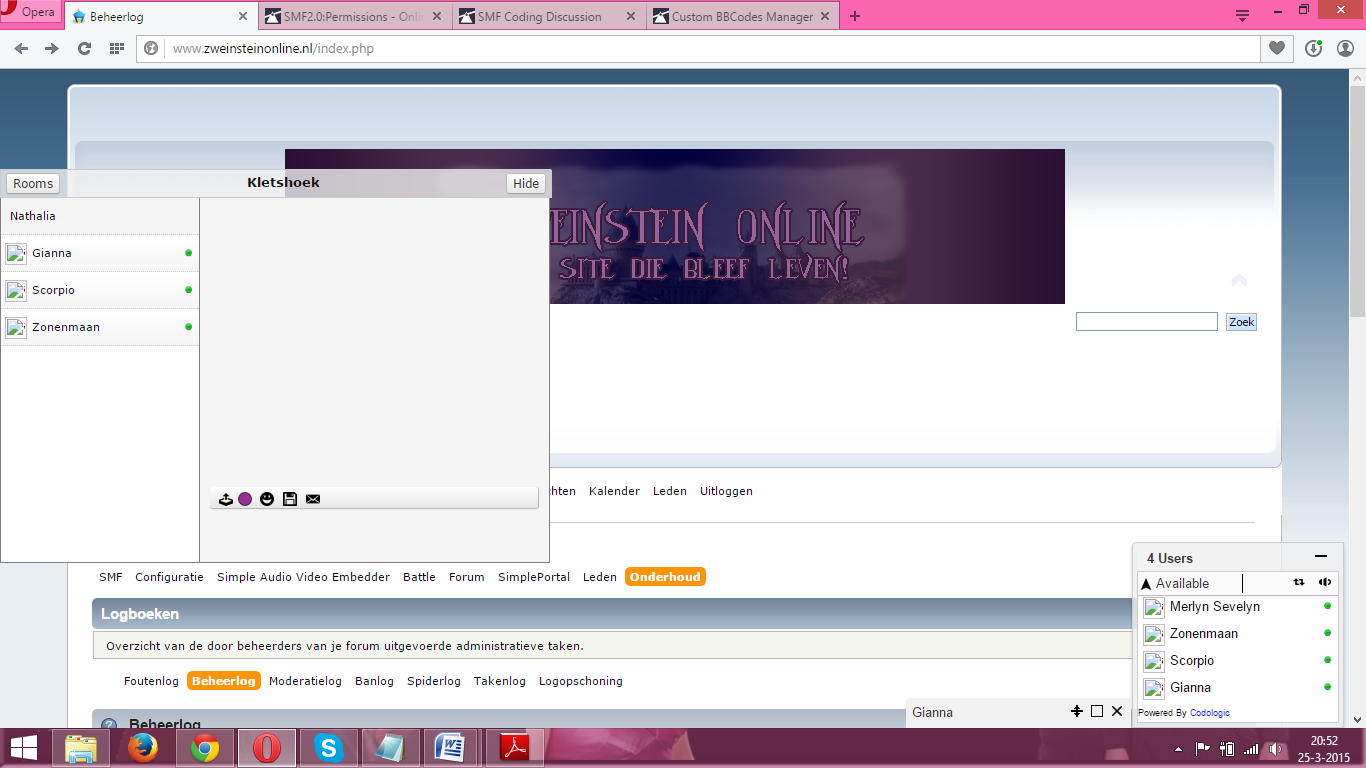
When we’re trying to chat at the big chat, we aren’t able to find the textbox to write your message in. There’s no textbox and no cursor. I’ve attached a printscreen from the chatbox to show you what I mean.

551314096a593.png

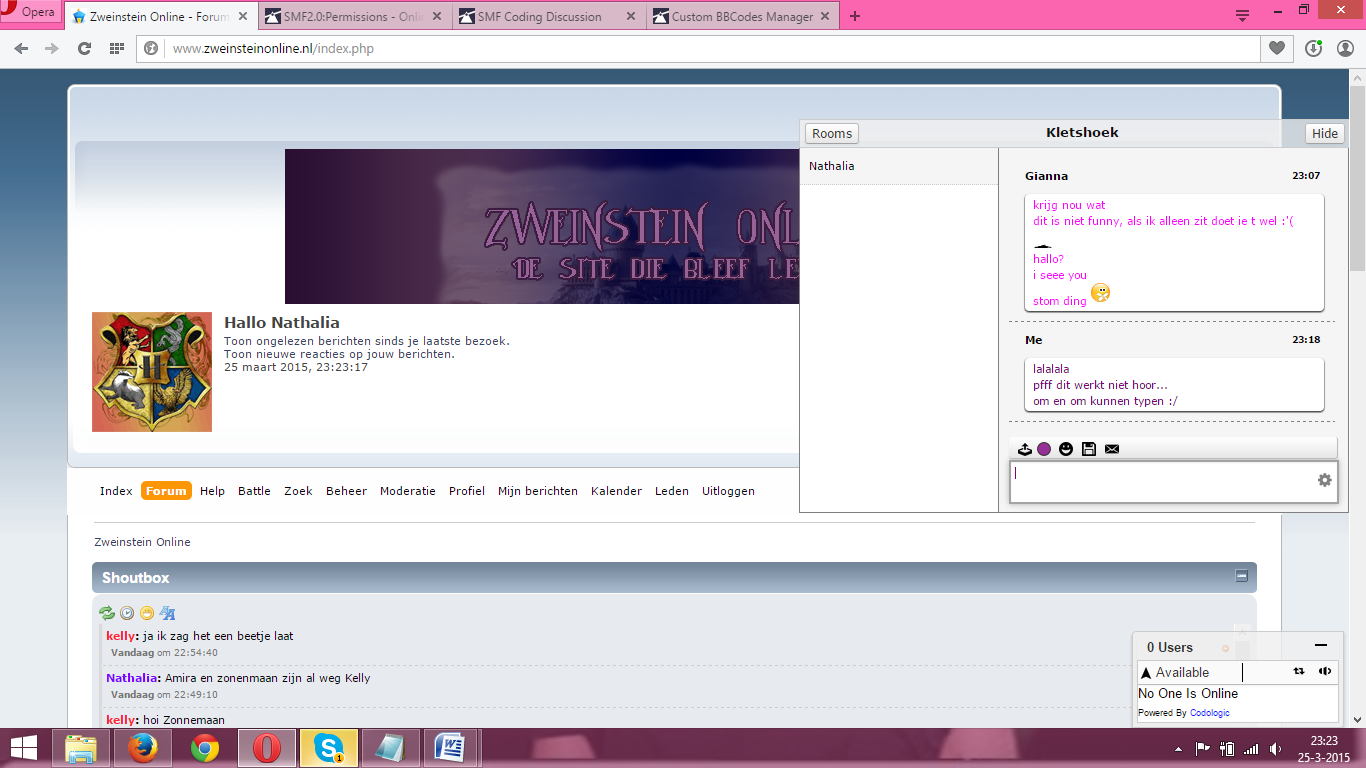
When one of us was alone in a channel there was somehow a textbox, but when there are more people it was gone. And there was only one person who experienced this. I also have a printscreen of what you see when you are alone in the chat.

551337c176cf1.png

We were thinking about purchasing the chat, but if we can’t make it work it’s not usefull to buy it anyways. So please help us as soon as you can.

We also made a testaccount. The login files are as followed:
Username: Dummy
Password: Welkom01

Greetings
ZweinsteinOnline team.
www.zweinsteinonline.nl

Hello, While testing with the free install we’re finding some sort of bug, that makes the chat doesn’t work properly. When we’re trying to chat at the big chat, we aren’t able to find the textbox to write your message in. There’s no textbox and no cursor. I’ve attached a printscreen from the chatbox to show you what I mean. ![551314096a593.png](serve/attachment&path=551314096a593.png) When one of us was alone in a channel there was somehow a textbox, but when there are more people it was gone. And there was only one person who experienced this. I also have a printscreen of what you see when you are alone in the chat. ![551337c176cf1.png](serve/attachment&path=551337c176cf1.png) We were thinking about purchasing the chat, but if we can’t make it work it’s not usefull to buy it anyways. So please help us as soon as you can. We also made a testaccount. The login files are as followed: Username: Dummy Password: Welkom01 Greetings ZweinsteinOnline team. www.zweinsteinonline.nl
edited Mar 25 '15 at 10:34 pm

Hi,

Your test account login details are not working.
Can you recheck the details ?

Hi, Your test account login details are not working. Can you recheck the details ?

Hello Adesh.
I just checked the testaccount login settings. It should be working now.
Thanks for willing to help us.

Hello Adesh. I just checked the testaccount login settings. It should be working now. Thanks for willing to help us.

Hello Adesh,
I think we are being overlooked? which we can understand because you guys have a lot more to do. But i thought i would check in again to ask if you can explain how to solve this?
Thanks ahead smile
p.s. forgive me our bad english. We're not native speakers, that doesn make it easier.

Hello Adesh, I think we are being overlooked? which we can understand because you guys have a lot more to do. But i thought i would check in again to ask if you can explain how to solve this? Thanks ahead :) p.s. forgive me our bad english. We're not native speakers, that doesn make it easier.
edited Apr 5 '15 at 10:46 pm

Hi,

We are sorry for the delay, we were very busy for the past 2 weeks.

We checked your website and found that the textbox div has been hidden.

There is some error server side causing this issue.

Try making following change:

Open freichat/server/drivers/SMF2.php

Around line 60, replace

return $res[$this->avatar_field_name];

with

return isset($res[$this->avatar_field_name]) ? $res[$this->avatar_field_name] : false;
Hi, We are sorry for the delay, we were very busy for the past 2 weeks. We checked your website and found that the textbox div has been hidden. There is some error server side causing this issue. Try making following change: Open freichat/server/drivers/SMF2.php Around line 60, replace ``` return $res[$this->avatar_field_name]; ``` with ``` return isset($res[$this->avatar_field_name]) ? $res[$this->avatar_field_name] : false; ```
edited Apr 8 '15 at 3:49 pm

Thanks for all the help adesh! I figured you would be busy.
It finally works, now if i find out why the avatars aren't showing i would be so happy.

However, now we can test it properly.
So thank you!

Thanks for all the help adesh! I figured you would be busy. It finally works, now if i find out why the avatars aren't showing i would be so happy. However, now we can test it properly. So thank you!
edited Apr 11 '15 at 2:39 pm

Same issue here. The described workaround unfortunately didn't solve it for us. Still no text field in the chat rooms. The website is www.schulfrei-community.com. Any other ideas how we can make the chat rooms work?
Thanks,
Stefanie

Same issue here. The described workaround unfortunately didn't solve it for us. Still no text field in the chat rooms. The website is www.schulfrei-community.com. Any other ideas how we can make the chat rooms work? Thanks, Stefanie

having the same issue and the work around didn't work for us ether. been trying to get them to help fix this for months with no luck in getting solutions.

having the same issue and the work around didn't work for us ether. been trying to get them to help fix this for months with no luck in getting solutions.

Hi

@ZweinsteinOnline Team, the test account login details are again not working.

@Stefanie Mohsennia, Can you please create a separate topic and provide us with two test account to check your problem.

Hi @ZweinsteinOnline Team, the test account login details are again not working. @Stefanie Mohsennia, Can you please create a separate topic and provide us with two test account to check your problem.

I think my collegea disabled the password because of it showing here. smile But the account should be working again. In the little chat we disabled showing the avatars, but in the chatroom they should show


Thanks for being so helpfull

I think my collegea disabled the password because of it showing here. ;) But the account should be working again. In the little chat we disabled showing the avatars, but in the chatroom they should show Thanks for being so helpfull
edited Apr 13 '15 at 10:33 pm

Many thanks for this solution, it works. But I have problem with avatars, as it written above.

It finally works, now if i find out why the avatars aren't showing i would be so happy.

Can anyone suggest solution? Avatars doesnt work very well.

Thank you in advance and sorry for my bad english.

EDIT: You can try this bugs there: http://forum.rapidteam.cz/

I turn on chat for host's, si you can test it there. I only change this:

 public function avatar_url($res) {

        return isset($res[$this->avatar_field_name]) ? $res[$this->avatar_field_name] : false ;
    }
Many thanks for this solution, it works. But I have problem with avatars, as it written above. >It finally works, now if i find out why the avatars aren't showing i would be so happy. Can anyone suggest solution? Avatars doesnt work very well. Thank you in advance and sorry for my bad english. EDIT: You can try this bugs there: http://forum.rapidteam.cz/ I turn on chat for host's, si you can test it there. I only change this: ```` public function avatar_url($res) { return isset($res[$this->avatar_field_name]) ? $res[$this->avatar_field_name] : false ; } ````
edited Jun 7 '15 at 6:15 pm

Hi @starek4 ,

Can you provide us two test accounts for your website ?
We cannot test the avatars without logging in.

Hi @starek4 , Can you provide us two test accounts for your website ? We cannot test the avatars without logging in.
Necessity is the mother of all inventions!

Yes, of course i can.

There it is:
acc: test1
pass: test1
-> i set into this acc avatar from this URL

http://forum.rapidwelfare.cz/download/file.php?avatar=2_1405191785.jpg

acc: test2
pass: test2

I set language of this acc's to English.

Thank you in advance! smile

EDIT: I found out that sound beep doesnt work properly, when i try use "FreiChat.beep.play()" in Console, nothing happened. Can you give me some advice how ti fix it?

Yes, of course i can. There it is: acc: test1 pass: test1 -> i set into this acc avatar from this URL ```` http://forum.rapidwelfare.cz/download/file.php?avatar=2_1405191785.jpg ```` acc: test2 pass: test2 I set language of this acc's to English. Thank you in advance! :) EDIT: I found out that sound beep doesnt work properly, when i try use "FreiChat.beep.play()" in Console, nothing happened. Can you give me some advice how ti fix it?
edited Jun 8 '15 at 10:35 pm

Hi,

What is the url to the avatar which was not working ?

The avatar for the user 'test2' doesn't seem to be working.

Which version of SMF are you using ?

Hi, What is the url to the avatar which was not working ? The avatar for the user 'test2' doesn't seem to be working. Which version of SMF are you using ?
Necessity is the mother of all inventions!
http://starekit.cz/with-avatar.png
http://starekit.cz/without-avatar.png

Avatar of test2 is un-set (without avatar), im using SMF 2.0.10.

And sound of chat does not work too.

```` http://starekit.cz/with-avatar.png http://starekit.cz/without-avatar.png ```` Avatar of test2 is un-set (without avatar), im using SMF 2.0.10. And sound of chat does not work too.

Ok, guys.

This chat has so much bug's with SMF 2.0.10 integration, so we decided not to use it.

I'm sorry, and thank you for your time.

I wish you good luck , maybe next time with another application smile

Bye! smile

Ok, guys. This chat has so much bug's with SMF 2.0.10 integration, so we decided not to use it. I'm sorry, and thank you for your time. **I wish you good luck , maybe next time with another application :) ** Bye! :)
718
15
6
live preview
enter atleast 10 characters
WARNING: You mentioned %MENTIONS%, but they cannot see this message and will not be notified
Saving...
Saved
With selected deselect posts show selected posts
All posts under this topic will be deleted ?
Pending draft ... Click to resume editing
Discard draft