Codoforum related discussions
New profile fields?

Is there a way to add extra publicly visible fields to the user profile? I want to add two fields and, if possible, limit each of these fields to 32 characters.

Thank you.

Is there a way to add extra publicly visible fields to the user profile? I want to add two fields and, if possible, limit each of these fields to 32 characters. Thank you.

Creature Conduit Sanctuary, a permaculture village for artists... https://creatureconduitsanctuary.net

We have not added provided an option in the backend for custom profile fields.

We are thinking where to show these custom profile fields in the user profile page.

If you have any suggestions, please let us know.

But, if you want, it is possible to manually add profile fields.

We have not added provided an option in the backend for custom profile fields. We are thinking where to show these custom profile fields in the user profile page. If you have any suggestions, please let us know. But, if you want, it is possible to manually add profile fields.
Necessity is the mother of all inventions!

Will you tell me how to add them manually, please? I don't mind going into the code and adding things as long as i know which files to edit and what lines to add (i'm learning as i go).

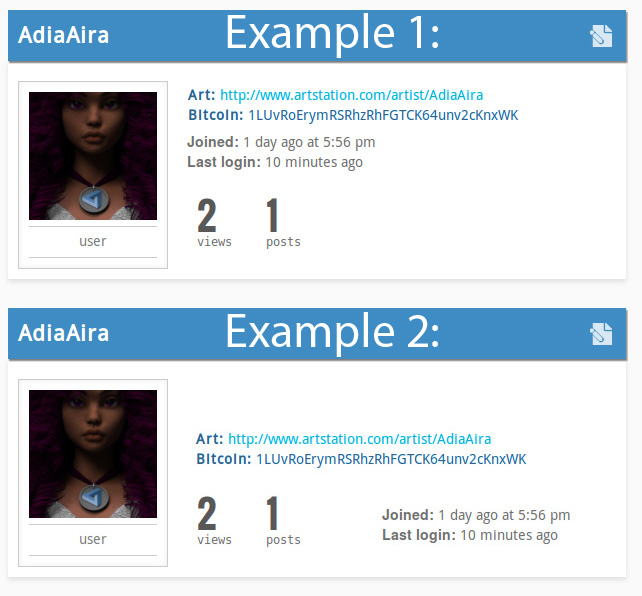
As for where to show the custom profile fields in the user profile page... i suppose two or three lines could fit above "Joined" and "Last login"... at least, that's how it looks... (See Example 1)

Another option could be to move "Joined" and "Last login" down next to "views" and "posts", and the space above it would be enough for a really brief 'about me' and two short lines of info (a website and a twitter username, for example... or in my case, a bitcoin address and a link to an artist's online art gallery). (See Example 2)

(Note, the examples were created in photoshop... i have no idea how that would work in code.)

545ab6f15a471.jpg

Will you tell me how to add them manually, please? I don't mind going into the code and adding things as long as i know which files to edit and what lines to add (i'm learning as i go). As for where to show the custom profile fields in the user profile page... i suppose two or three lines could fit above "Joined" and "Last login"... at least, that's how it looks... (See Example 1) Another option could be to move "Joined" and "Last login" down next to "views" and "posts", and the space above it would be enough for a really brief 'about me' and two short lines of info (a website and a twitter username, for example... or in my case, a bitcoin address and a link to an artist's online art gallery). (See Example 2) (Note, the examples were created in photoshop... i have no idea how that would work in code.) ![545ab6f15a471.jpg](serve/attachment&path=545ab6f15a471.jpg)

Creature Conduit Sanctuary, a permaculture village for artists... https://creatureconduitsanctuary.net

Will you tell me how to add them manually, please? I don't mind going into the code and adding things as long as i know which files to edit and what lines to add (i'm learning as i go).

Here you go:

Step 1

You need to first add columns to the codo_users table eg. 'art' & 'bitcoin'

Step 2

You have to display these fields in the profile.
Open file:

~sites/default/themes/default/templates/user/profile/view.tpl

You have to add your fields in the div with the class 'codo_user_details'.

Step 3

Now, you need to add these fields in the profile edit page.
Open file:

~sites/default/themes/default/templates/user/profile/edit.tpl

Add your fields inside the first form defined there.

Step 4

Saving these details to database.

Open file:

~sys/Controller/user.php

Edit the function edit_profile() ,

Edit the variable $values as folows

        $values = array(
            "name" => \CODOF\Filter::msg_safe($_POST['name']),
            "signature" => \CODOF\Format::omessage($_POST['signature']),
            "bitcoin" => strip_tags($_POST['bitcoin']),
             ....
        );

The above array is a name value pair of the codo_users columns and the POST data.

We will be automating the whole process with more advanced options either in the V2.6 or in V2.7

>Will you tell me how to add them manually, please? I don't mind going into the code and adding things as long as i know which files to edit and what lines to add (i'm learning as i go). Here you go: ###Step 1 You need to first add columns to the `codo_users` table eg. 'art' & 'bitcoin' ###Step 2 You have to display these fields in the profile. Open file: ``` ~sites/default/themes/default/templates/user/profile/view.tpl ``` You have to add your fields in the div with the class 'codo_user_details'. ###Step 3 Now, you need to add these fields in the profile edit page. Open file: ``` ~sites/default/themes/default/templates/user/profile/edit.tpl ``` Add your fields inside the first form defined there. ###Step 4 Saving these details to database. Open file: ``` ~sys/Controller/user.php ``` Edit the function edit_profile() , Edit the variable $values as folows ``` $values = array( "name" => \CODOF\Filter::msg_safe($_POST['name']), "signature" => \CODOF\Format::omessage($_POST['signature']), "bitcoin" => strip_tags($_POST['bitcoin']), .... ); ``` The above array is a name value pair of the `codo_users` columns and the POST data. We will be automating the whole process with more advanced options either in the V2.6 or in V2.7

Necessity is the mother of all inventions!
edited Nov 6 '14 at 12:06 pm

Thank you! smile

Thank you! :)

Creature Conduit Sanctuary, a permaculture village for artists... https://creatureconduitsanctuary.net

Just followed the instructions... Worked like a charm!

Thank you! I officially love Codoforum. smile

Just followed the instructions... Worked like a charm! Thank you! I officially love Codoforum. :D

Creature Conduit Sanctuary, a permaculture village for artists... https://creatureconduitsanctuary.net

edited Nov 7 '14 at 1:13 am
283
5
3
live preview
enter atleast 10 characters
WARNING: You mentioned %MENTIONS%, but they cannot see this message and will not be notified
Saving...
Saved
With selected deselect posts show selected posts
All posts under this topic will be deleted ?
Pending draft ... Click to resume editing
Discard draft