FreiChat related discussions
"invite your friend" user

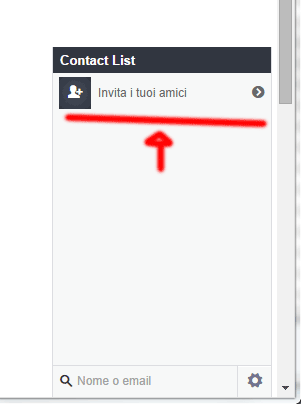
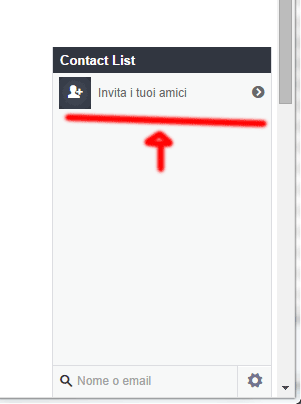
Please see the image, how can i do something like that? I mean some kind of "ghost" user (maybe it should appears just in case of empty chat, maybe always, i dont know what's the better choice yet).
The user is nothing but a link to an invite page (i already have obiouvsly)
541c95d6266bf.gif

Please see the image, how can i do something like that? I mean some kind of "ghost" user (maybe it should appears just in case of empty chat, maybe always, i dont know what's the better choice yet). The user is nothing but a link to an invite page (i already have obiouvsly) ![541c95d6266bf.gif](serve/attachment&path=541c95d6266bf.gif)
Hi,

You need to edit the html in freichat/client/freichat.js around line 45.

If you are finding that difficult, you can dynamically insert your code using javascript.

Let us know if you have any problem or need any more help.

Hi, You need to edit the html in freichat/client/freichat.js around line 45. If you are finding that difficult, you can dynamically insert your code using javascript. Let us know if you have any problem or need any more help.

could you be more specific about the div i should edit?
the #45-47 is

            <div id='frei_chatroom_lobby_btn' class='frei_chatroom_btn'>TEST1" + freidefines.TRANS.chatroom_tab_rooms + "</div>\n\
            <div id='frei_roomtitle' class='frei_roomtitle'>TEST2</div>\n\
            <div id='frei_chatroom_back_btn' class='frei_chatroom_btn'>TEST3" + freidefines.TRANS.chatroom_hide + "</div>\n\

i tried to add some static text, but i can't see TEST1, TEST2, TEST3

could you be more specific about the div i should edit? the #45-47 is ```` &amp;lt;div id=&#039;frei_chatroom_lobby_btn&#039; class=&#039;frei_chatroom_btn&#039;&amp;gt;TEST1&quot; + freidefines.TRANS.chatroom_tab_rooms + &quot;&amp;lt;/div&amp;gt;\n\ &amp;lt;div id=&#039;frei_roomtitle&#039; class=&#039;frei_roomtitle&#039;&amp;gt;TEST2&amp;lt;/div&amp;gt;\n\ &amp;lt;div id=&#039;frei_chatroom_back_btn&#039; class=&#039;frei_chatroom_btn&#039;&amp;gt;TEST3&quot; + freidefines.TRANS.chatroom_hide + &quot;&amp;lt;/div&amp;gt;\n\ ```` i tried to add some static text, but i can&#039;t see TEST1, TEST2, TEST3

Sorry for the late reply .

Instead of editing the files, why not insert your code dynamically using javascripy .

Use the

$('#id').append('Your contents')

in jQuery .
You can find the id to append your contents using chrome developer tools .

Sorry for the late reply . Instead of editing the files, why not insert your code dynamically using javascripy . Use the ```` $(&#039;#id&#039;).append(&#039;Your contents&#039;) ```` in jQuery . You can find the id to append your contents using chrome developer tools .

this code "almost" works because keeps appeding text, the first append doesn't work because freichat windows it is not loaded yet..

any help? basically i would to know where to place this append() to be sure it would works (obiouvsly without using loops).

i noticed using frei_super_minimize id is not the best choice too..

jQuery.noConflict();
jQuery(document).ready(function($){
$('#frei_super_minimize').append('Your contents')  


    setTimeout(loop, 2000);
    function loop() {
$('#frei_super_minimize').append('Your contents')  
        setTimeout(loop, 2000);
    }

})
this code &quot;almost&quot; works because keeps appeding text, the first append doesn&#039;t work because freichat windows it is not loaded yet.. any help? basically i would to know where to place this append() to be sure it would works (obiouvsly without using loops). i noticed using frei_super_minimize id is not the best choice too.. ```` jQuery.noConflict(); jQuery(document).ready(function($){ $(&#039;#frei_super_minimize&#039;).append(&#039;Your contents&#039;) setTimeout(loop, 2000); function loop() { $(&#039;#frei_super_minimize&#039;).append(&#039;Your contents&#039;) setTimeout(loop, 2000); } }) ````

You can run this code after freichat loads by adding the code in the following method:

FreiChat.API.onUser() in freichat/client/plugins.js

Like this:

onUser: function(data, first) {

   if(first) {

      //will only run the first time
      $('#frei_super_minimize').append('Your contents')  
   }
}
You can run this code after freichat loads by adding the code in the following method: FreiChat.API.onUser() in freichat/client/plugins.js Like this: ``` onUser: function(data, first) { if(first) { //will only run the first time $(&#039;#frei_super_minimize&#039;).append(&#039;Your contents&#039;) } } ```
231
5
0
live preview
enter atleast 10 characters
WARNING: You mentioned %MENTIONS%, but they cannot see this message and will not be notified
Saving...
Saved
With selected deselect posts show selected posts
All posts under this topic will be deleted ?
Pending draft ... Click to resume editing
Discard draft