Let us know!

We encourage new members to post a short description on how they use our products in their site. you may advertise your site here.

84
1
nmodern posted May 1 '19 at 7:44 pm

While editing custom user fields title input shows incorrect value, it shows the same value what is set for name

You can fix it by changing

{if isset($field.title)}{$field.name}{/if}

to

{if isset($field.title)}{$field.title}{/if}

in admin/layout/templates/users/profile_fields_edit.tpl on line 47

recent by admin  ·  May 3 '19 at 4:35 pm
112
1
nmodern posted Apr 30 '19 at 7:59 pm

Hi. I have found bug in Language settings. When you create new language and try to edit it, new values are stored in the file, but you cannot see them when you reload the page.

You can fix it by changing line 30 in admin/modules/system/language_settings/edit_language.php

from
$CODOT = array_merge($CODOT, $english_values);

to
$CODOT = array_merge($english_values, $CODOT);

please fix this in the next release of codoforum.

Thanks to authors for this beautiful forum.

And please add normal driver to FreiChat for Codoforum because i was strugling while got it work with, because Custom driver is not handling avatars at all.

recent by admin  ·  Apr 30 '19 at 8:16 pm
252
2
mannu4u4u posted Aug 10 '15 at 7:51 pm

Can anyone please suggest me, where I can edit the HTML Layouts of the site, I mean, like we do in wordpress like, there is a main index.php file, where we can add functions in the header, or editing the existed functions, and Where to go for single topic layout editing, like we do in wordpress by editing the single-post.php..
Many Thanks in Advance

recent by kasper2  ·  Jun 3 '18 at 1:38 pm
234
1

Hello,
So i installed codoforum on my server machine and i did the installation on the local network. Browsing the foum on the local network works just fine but when you are out side all the glyphicons etc wont load and there for the loading time will be horible. I found out that codoforum had installed the directory paths on the local network ip adress (192.168...../path/to/directory) and there for you cannot access it while outside of the network. Any idea how to fix this?

recent by admin  ·  Feb 7 '18 at 11:36 pm
838
0
SaifUsmani posted Dec 5 '16 at 5:02 am

We have built a software web-portal (POS system) in PHP language.
Which is working fine when online.
But when the internet goes down in the stores, the software stops completely and the managers are not able to make bills till the time internet is live again!

Hence we want to build an offline module, which involves local server setup (wamp or easy-PHP)and deploying the code offline on the local machine/PC
The problem we are facing is syncing the offline and online MySQL databases.
Moreover, there are 6 different stores which will be running the offline billing module hence the problem increase here.

We want to build a program that can sync both the database offline and online periodically and when the internet goes down and resumes for 6 different stores.

Don't know whether this plan is good or not. If not then need guidance on how to crack/tackle this problem!

We have used HTML, CSS for design and display, javascript and jquery for client side and PHP for server side programming. We have also used ajax.

272
2
Palidino posted Sep 26 '16 at 7:46 am

EDIT: Forget everything else for a second, I just realized the latest version, listed on the download page, is over a year old. Is it safe to assume this forum software has basically been abandoned?

When trying to create a new category:
Unable to require /var/www/html/codoforum/sys/CODOF/File/Log.php
Fatal error: Class 'CODOF\File\Log' not found in /var/www/html/codoforum/sys/CODOF/File/Upload.php on line 94

There is also no way to select an existing category image on the server. You instead either have to download the image to your computer and select it for the category to be uploaded again, or choose a new image all together. A way to choose an existing category image already on the server would be great.

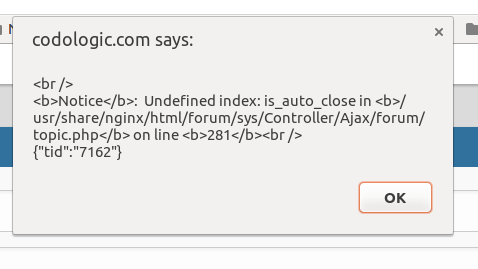
Also while trying to post this message, I received an error.
<br />
<b>Notice</b>: Undefined index: is_auto_close in <b>/usr/share/nginx/html/forum/sys/Controller/Ajax/forum/topic.php</b> on line <b>281</b><br />
{"tid":"8033"}

Aaaand while making this edit and then saving it, I was redirected to a page that said
The page you are looking for does not exists!

Update on the error associated with my install: the problem was a result of not having permissions set for writing, however this line in of itself was causing an error on top of that error
Log::error("Upload directory not writable"smile;

I have a new issue though: whenever I try to use my own images for categories instead of re-uploading the ones codo came with, I end up with a blank uploaded image and icon. I even tried changing the size of the image to 420x420 before uploading (under the assumption it would shrink the image if too large), but that didn't change the issue. I was able to manually upload my image in place of the image uploading through the site, however having to replace the image and icon every time I want to add one seems a bit counter productive.

^ Continuing on with that, while uploading a PNG results in a completely blank image and icon, uploading a SVG sort of works. The image and icon load, however they either fail to resize or incorrectly resize.

The default profile icon on the bar that follows the page at the top seems to be a broken link. I'm not sure if it only applies to when you setup the admin account or if it's accounts created through the registration form too.
/codoforum/sites/default/assets/img/profiles/icons/P_4c2900.png was not found

Not a bug but when changing your avatar, the existing image and icon should be deleted from the already saved image name before updating it to the new image name.

Searching with nothing typed in results in an infinite searching image until you refresh the page, instead of of not triggering a search when the search text field is empty.

Also I'd like to note that page views mean nothing when you can just refresh the page as many times as you'd like for whatever number you want. I really like the concept of how this forum software works, but it's quickly looking like it isn't remotely ready to be used for much of anything.

84
0
harry posted Apr 15 '16 at 8:35 pm

Hi,

I use this forum in combination with our Reservo Photohosting script. I hope to get a single login get to work for this.

for now is a seperate login needed, because SSO is not working.
From out the hosting I have made site-wide link to the forum and a link back.

https://1920hd.nl

72
290
2
Actions
Hide topic messages
Enable infinite scrolling
Previous
Next
All posts under this topic will be deleted ?
Pending draft ... Click to resume editing
Discard draft